OverlayFS for RedoxOS, Importance of Mentorship and Respect for Low Level Developers
2026-03-31Reports
When we were searching for a project to do for our final year submission, I came across a feature request on RedoxOS asking for OverlayFS support. I had kept it as something "I wish I could do". When pitching our ideas for the project, I also said that I wish we could do something like this, to my teammate faultypointer. Since, he was interested in working on low level too while the whole world was doing AI projects we decided that we would do it. Afterall, when we take on the project we must complete it anyhow, otherwise we risk getting the degree.
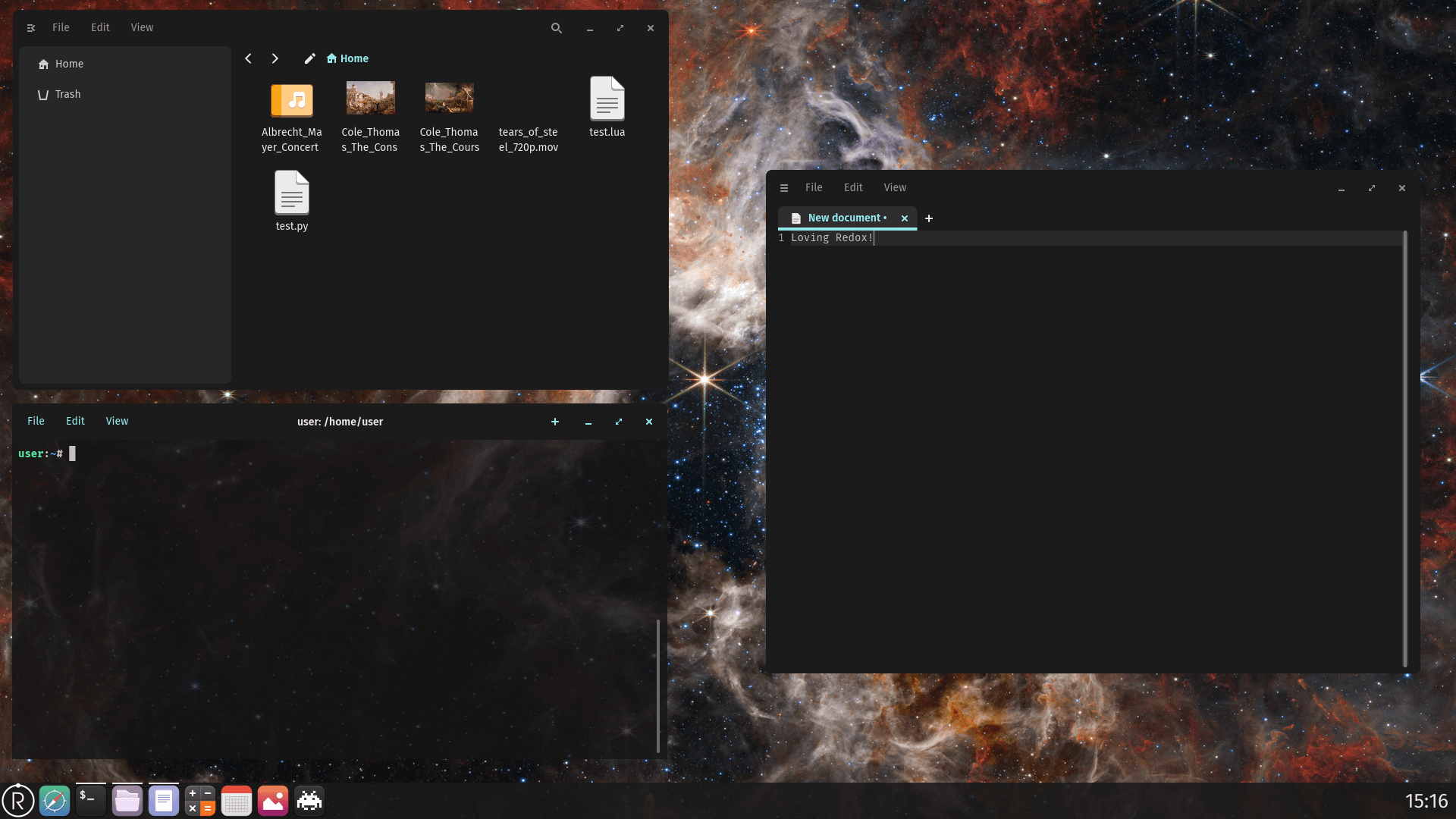
RedoxOS GUI running Cosmic Applications
And, so it started. We proposed the idea to the faculty and they accepted, but they said that it must be a completely original work, without using any existing code written by RedoxOS contributors. We then started the research on how the OS was architectured and how we could implement something like OverlayFS.
Note
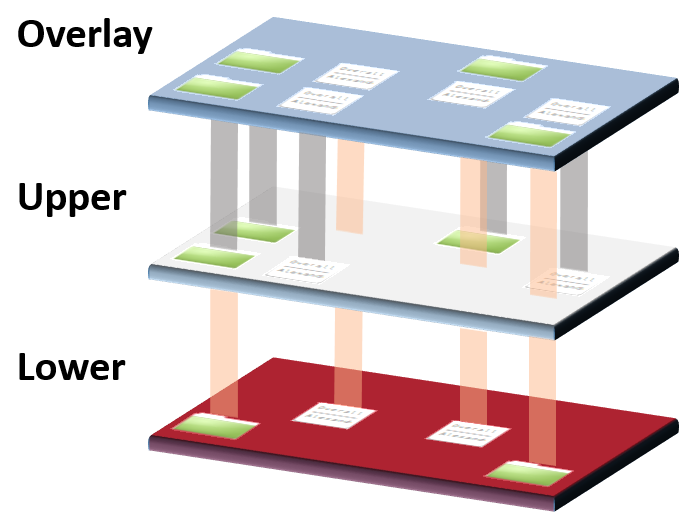
Overlay filesystems are pseudo-filesystems which combines multiple filesystems or multiple directories from same filesystems into one, resulting in a single directory structure that contains underlying files and sub-directories from all sources.
High Level representation of OverlayFS
The First Contact
When we contacted the people making RedoxOS on their matrix server, we found out that someone had started the preliminary work for OverlayFS. We then contacted him and said that we wanted to help make the thing. He was positive about it and said that though he couldn't mentor us for it, he would leave some notes for us to better kickstart the project. We took the notes and started the preliminary work on the alien codebase of redox-os.
The Struggle Begins
It was a completely new territory for us. Though we had some theoretical knowledge on Operating System and their Architecture from our syllabus, our practical experience for OS development was closer to none. Reading the RedoxOS Book was fun though, I got to learn about the various components of RedoxOS and what their philosophy was. Though I read about RedoxOS in detail, I hadn't made up my mind on where I would start developing the OverlayFS.
First few months, taking about the project and having in my mind that it's a low level project I wanted to do was like a dream. I was excited and so was faultypointer. We talked about the architecture and discussed the plans and theory of how OverlayFS worked, we gathered resources and references. Those were exciting days.
The Build System
It had been very long since we have just studied the theory and we hadn't implemented anything. Until that time we managed to understand the build pipeline and how the source code of RedoxOS was structured. We were using NixOS at the time so, we had to jump to a more normal Linux distribution to make out life easier to work with building RedoxOS. I don't even know how many times we built RedoxOS from scratch deleting containers and reinstalling them again and again and again.
Another thing we realized while building RedoxOS is that it wasn't self-hosted yet. Meaning, you couldn't build programs for RedoxOS from inside RedoxOS. We knew from James Matlik's Implementation Proposal that we had to make a delegate pattern in order to make it on Linux and then integrate it with RedoxOS. I wasn't familier to delegate patterns so, I was still learning about it.
The Initial Implementation
While I was busy wasting time asking AI to guide me to start the project, faultypointer had already written the preliminary filesystem struct and made the delegate struct to prototype it on Linux. While I hadn't done much, I was much relieved that actual work on the project was finally started. Finally we (by we mean just faultypointer) had started work on the project.
In the first implementation, a delegate FileSystem struct was written that would do the things the overlay scheme would do in the future. What it contained was:
- Functions for
open,read,write,close,unlink,readdir. - Helper functions for copying up files from lower to upper layer, checking for whiteout files and creating whiteout files.
- Some tests for those functions to verify that they were working as expected.
Scheming with SchemeMut then SchemeSync
After the SchemeMut for OverlayFS was implemented and the main scheme function was implemented we could test the workings of initial syscall implements on RedoxOS as well as on Linux. But, SchemeMut was not what the RedoxOS team was using for other schemes. Later, the SchemeMut implementation was replaced with SchemeSync which finally brought the project to a fairly usable state.
The Great Big Purge
After the verification that the implementation worked in practice, the initial structure of source code wasn't fit for a more involved implementation. The structure was reimplemented using rust's struct and impl syntax. All that was left was to implement each individual filesystem syscall that the scheme required to work with the OverlayFS implementation logic.
Starting to write syscalls, the rust libraries soon didn't cut it. Then libc had to be used.open was implemented. The most visual part of the whole project was done by the getdents syscall, which listed the directory entries that showed the logical merged/overlay layer of the OverlayFS, hence, that had to be implemented next.
Important
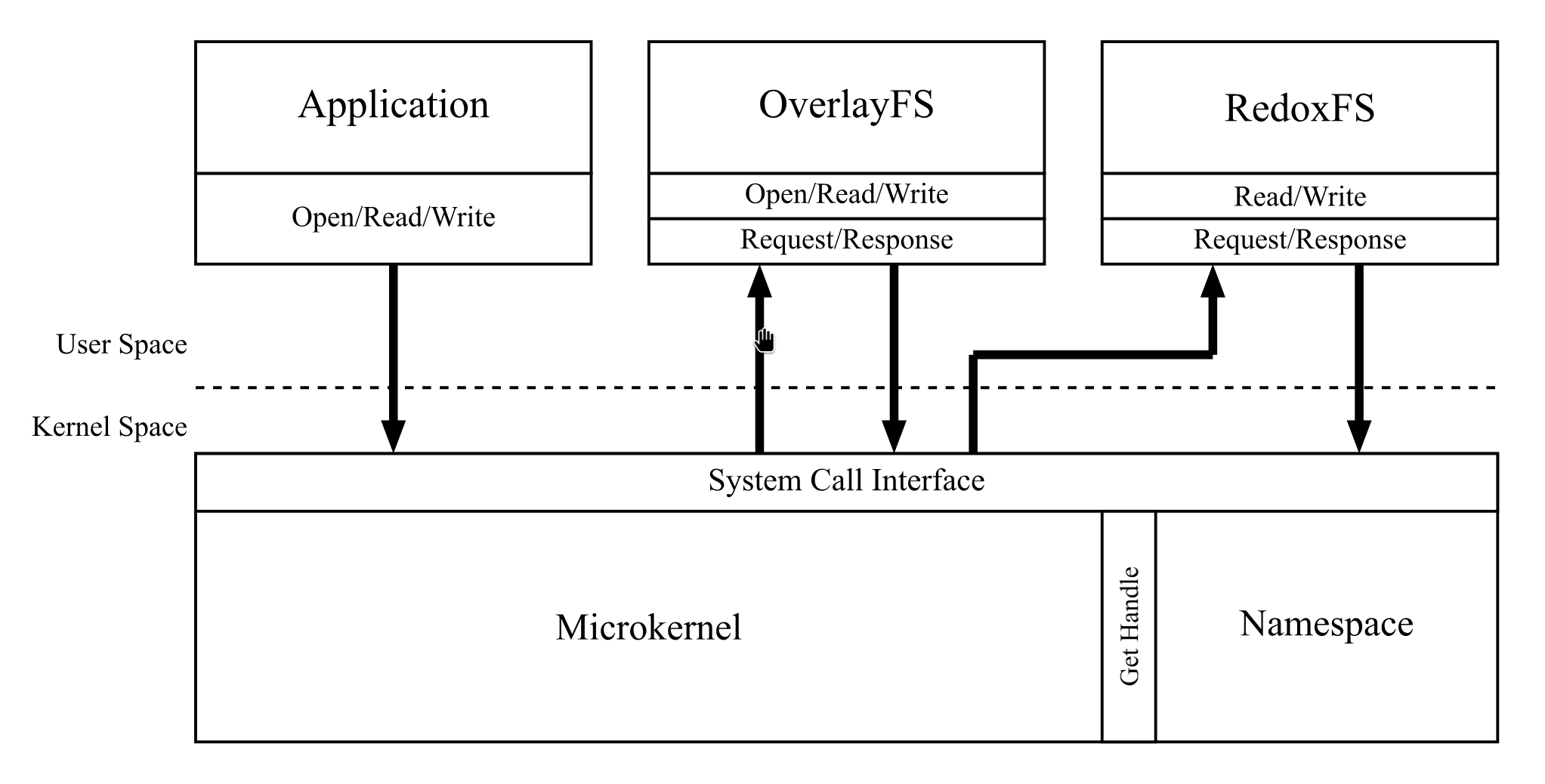
Due to RedoxOS being a microkernel based Operating System, it's own filesystem and our OverlayFS was outside the kernel space. The architecture of the OverlayFS can be visualized as follows:
Architecture of the filesystem within RedoxOS
System Calls
After everything was set up, all that remained was implementing more and more syscalls untill each one was implemented. The implemented syscalls in order are as follows:
open- Resolves path checking upper then lower layer, respects whiteouts, and forwards UID/GID for permission checks.getdents- Merges directory entries from upper then lower layer, excluding shadowed names and honoring opaque directories; maintains opaque offsets.read- Reads from whichever layer the file was resolved from at open time.write- Performs copy-on-write: copies lower-layer file to upper layer on first write, then writes to the upper copy.fpath- Retrieves the path for a file descriptor via the scheme interface.unlink- Removes upper-layer files directly; for lower-layer files creates a whiteout in the upper layer.rmdir- Validates directory emptiness and removes directories, creating upper-layer markers if the directory originated from lower layer.fchown- Triggers copy-up for lower-layer files, then applies ownership change to the upper-layer copy.fchmod- Triggers copy-up for lower-layer files, then applies permission change to the upper-layer copy.fsize- Returns size metadata from the layer where the file resides (upper or lower).fcntl- Manipulates file descriptor flags through the scheme interface.fvent- Registers events for asynchronous I/O through the scheme interface.flink- Creates hard links only within the upper layer; linking to a lower-layer file triggers copy-up first.ftruncate- Performs copy-on-write if needed, then truncates the upper-layer copy.statvfs- Aggregates filesystem statistics across both layers to report combined capacity and inode usage.futimens- Performs copy-on-write if needed, then updates timestamps on the upper-layer copy.dup- Duplicates file descriptors, preserving the resolved-layer behavior of the underlying handle.
Proof that Syscalls for OverlayFS Work(ed).
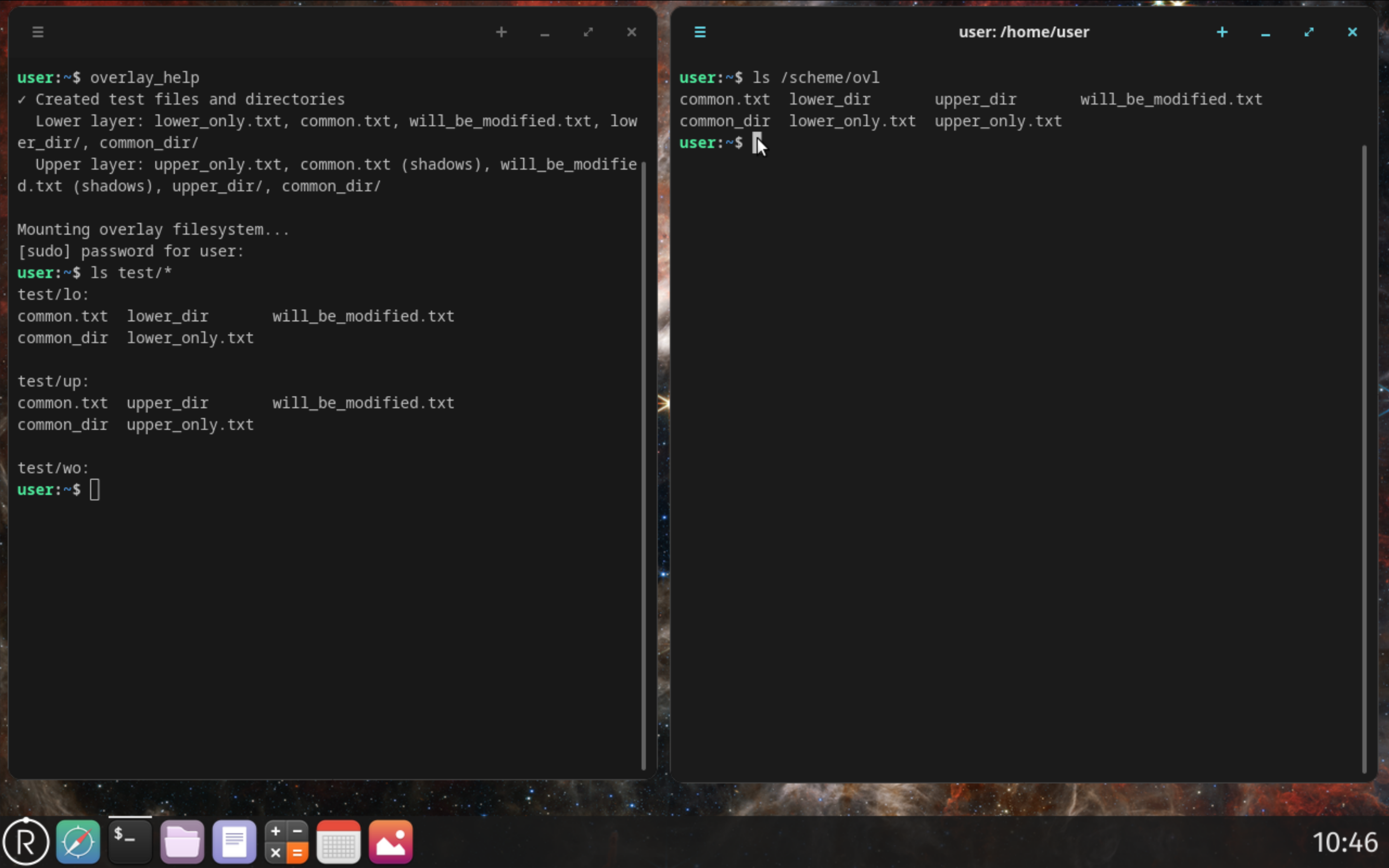
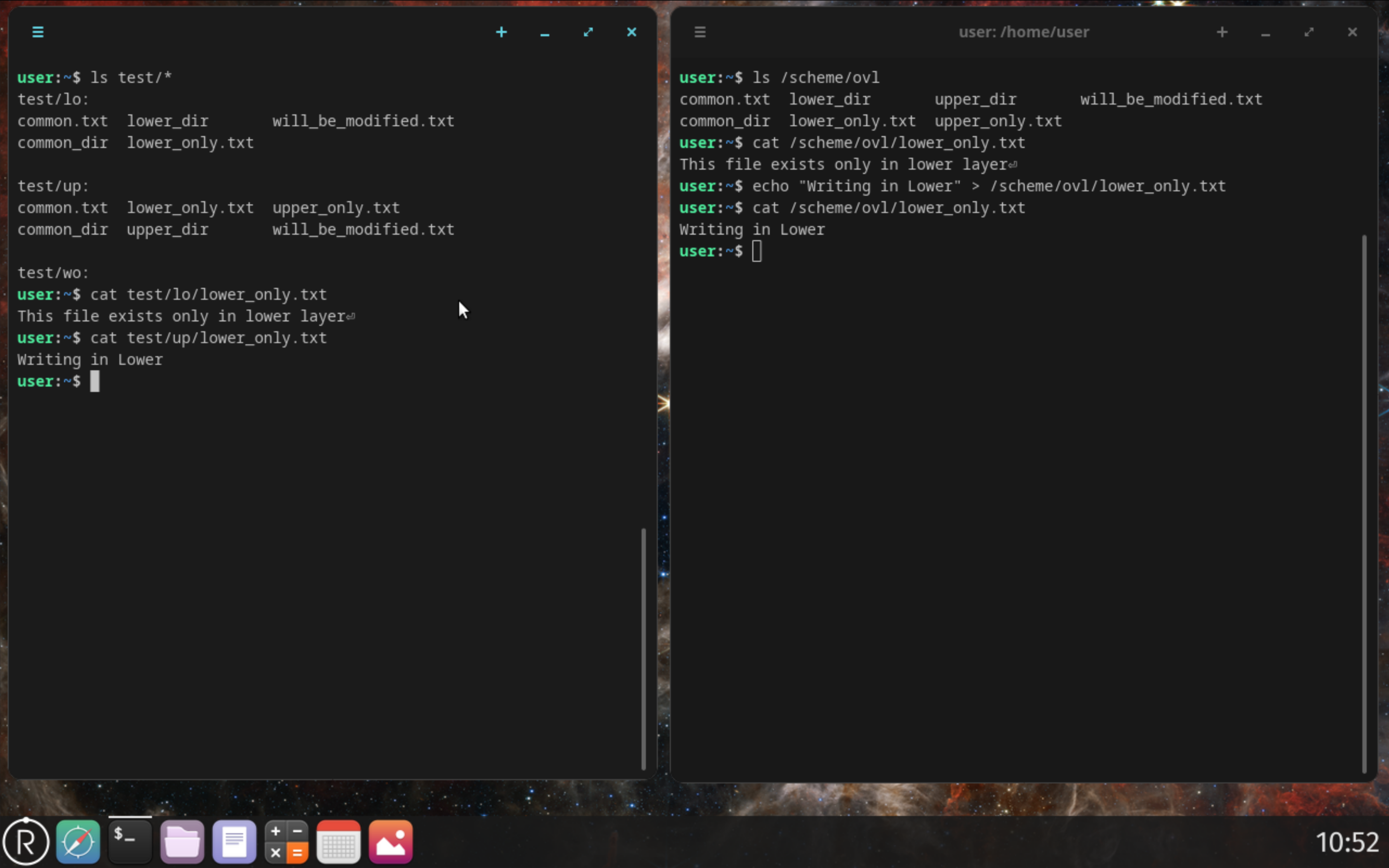
Copy-Up in Terminal UI
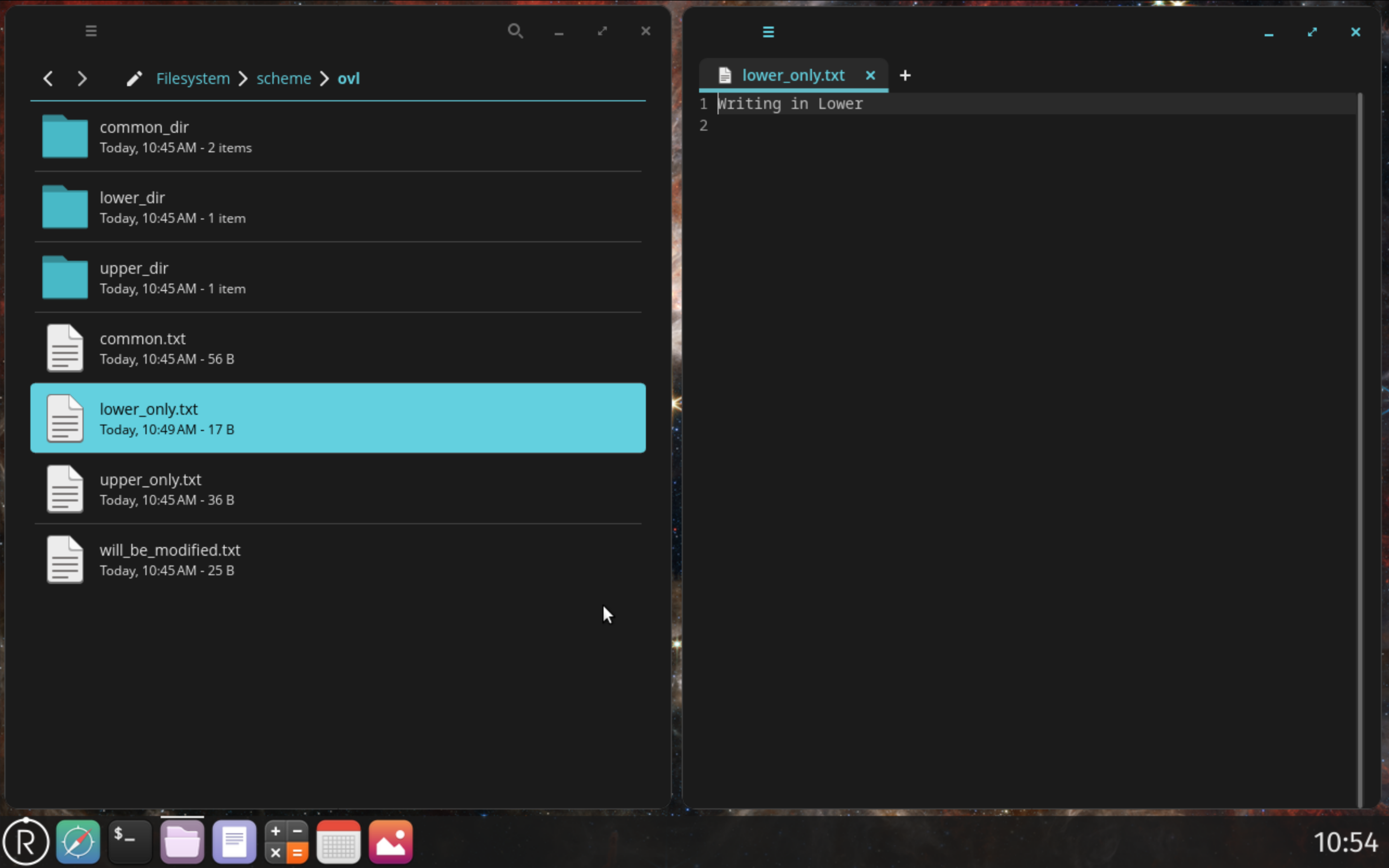
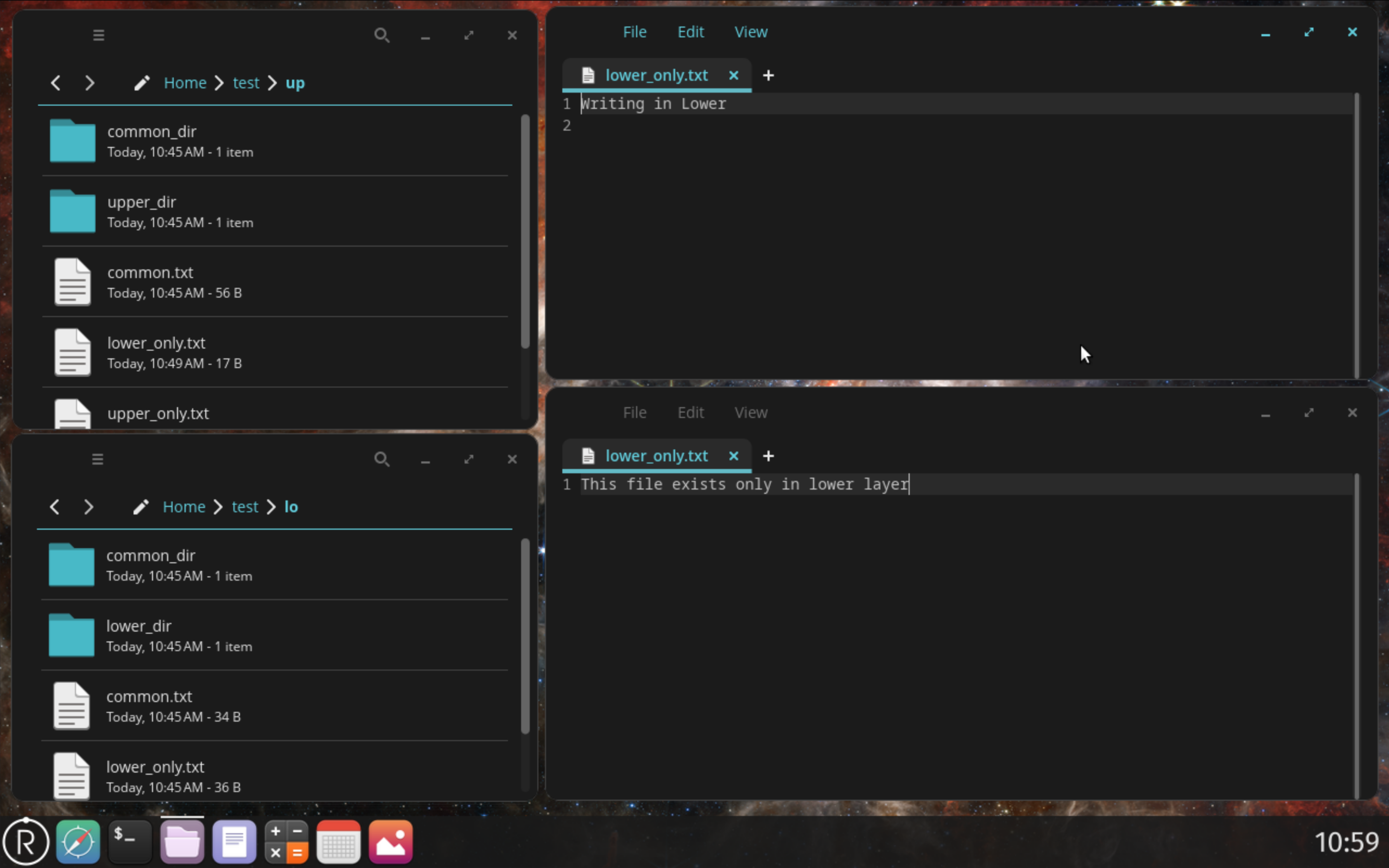
Copy-Up in Graphical UI
Change is Inevitable
Since RedoxOS is a very unstable Operating system, which is heavily in development, during the development of the OverlayFS, various parts had to be rewritten to keep up with upstream changes. Near the project submission there was mismatch between our overlay code and the upstream system changes (freshly pulled commits from RedoxOS) and it required fixes to path handling and validation.
So, we decided to limit the implementation on the older commit and settled to showing what already worked on our system in our final project demonstration. This means we won't able to contribute the implementation upstream, and to be very honest we are very insecure (almost unsatisfied) about our current implementation which is one more excuse for us to procrastinate now that the defence is over.
Mentors and Developers
Though everything I contributed to the project was mentored to me by faultypointer, he didn't have anyone who mentored him. I admire faultypointer for his dedication to the craft and his knowledge and flexibility to understand and work on an alien codebase. I don't even know if I had taken up the project and faultypointer wasn't on our team that we could even make an implementation of OverlayFS that actually worked.
Near the final defence I saw exhaustion and burnout on faulty's face that I had never seen before, I wasn't knowledged/skilled enough to help him either. That moment was the time I (maybe we both) realized the importance of mentor and mentorship. After all we are just students learning in this field.
Though I admire low level developers and I try to dabble on it, but, I also like visuals and graphics and something that looks presentable. The amount of work that faultypointer has put on this project compared to me is stellar, and of that work the final result being something so simple that can be explained in 3 sentences is very underwhelming (one might say anticlimactic). This project has immensely increased my respect towards the low-level developers and most importantly faultypointer (Sudesh).
End of an Era
This being a final year project of my bachelor degree also makes me very sentimental about it. Hopefully, we keep in touch even after we part ways to our respective future.
Love you brother! I'll find you from under the ocean and over the sky if you don't keep in touch. This is very much a warning as it is a request.